
Maintenance & RFQ Guides
KUKA iiQKA.AI Vision RFQ: What to Confirm Before Replacing Vision Hardware
A practical machine-vision RFQ checklist for KUKA robot cells covering cameras, lenses, lighting, controller software, AI computing, calibration and validation evidence.
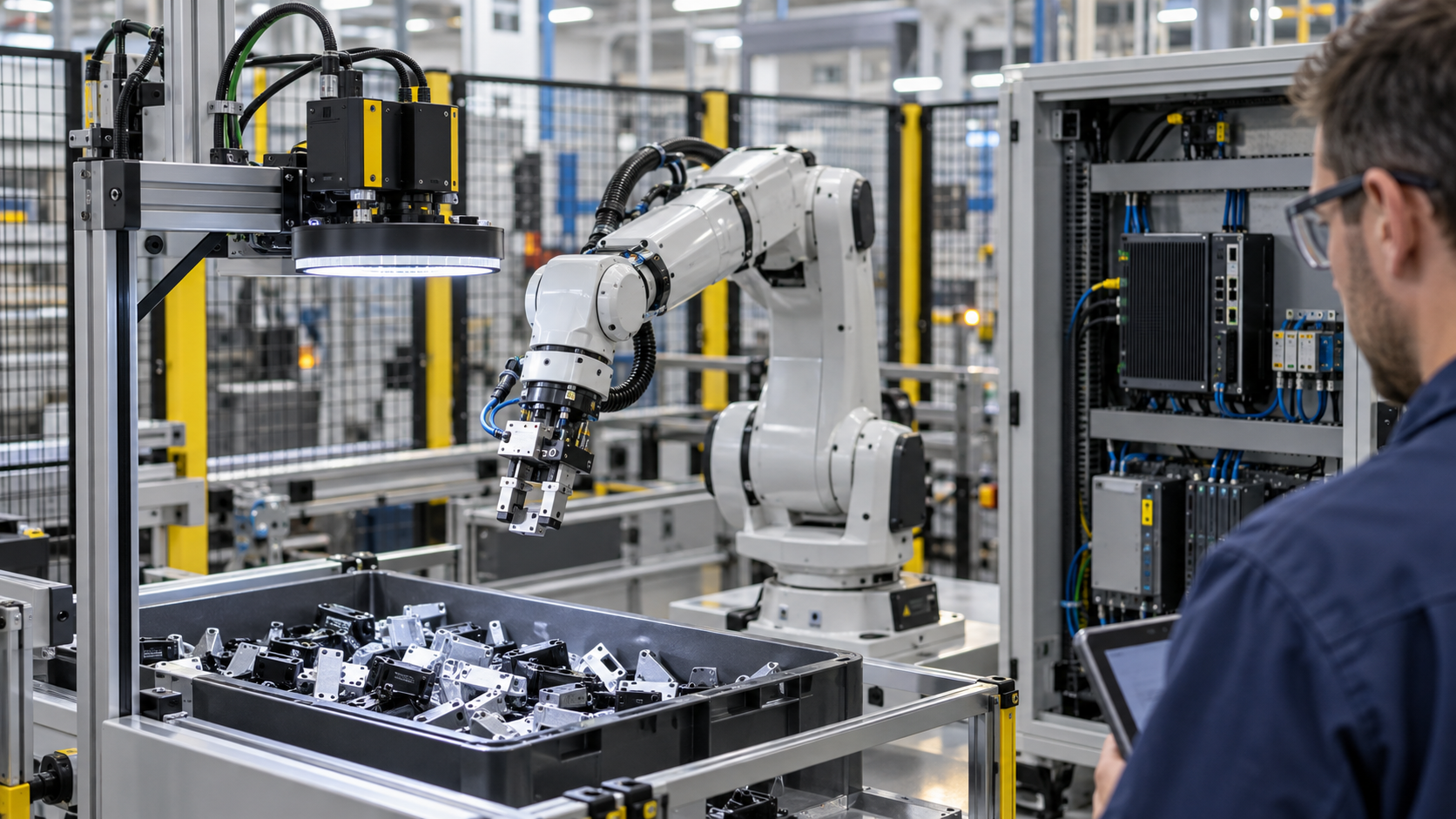
KUKA introduced iiQKA.AI Vision on October 8, 2026 as integrated 2D and 3D image-processing software for industrial robot applications. The company describes vision processing on an integrated computing unit in the controller, with use cases including bin picking, assembly, quality control and depalletizing. For a maintenance or procurement team, the practical question is not whether an AI vision label sounds suitable. It is whether the camera, lens, lighting, controller, software and robot application have been identified as one working system.
This guide turns the public KUKA announcement into a practical machine-vision RFQ checklist. It does not confirm stock, delivery, compatibility, performance or project suitability. Those points require a review of the installed robot, controller revision, application, parts and site conditions.
What the KUKA update actually covers
KUKA says iiQKA.AI Vision supports 2D and 3D vision and can be configured in iiQWorks with drag-and-drop workflows. The company also describes local processing on the KUKA AI Extension Platform, based on an integrated computing unit, and direct communication of position and gripping information to the robot. These are product-level statements from the official announcement; they are not a substitute for the exact software, hardware and licensing documentation for an installed cell.
Read the official KUKA iiQKA.AI Vision announcement for the source context. When preparing an RFQ, ask the supplier to distinguish confirmed product requirements from assumptions about a particular robot or vision task.
1. Identify the robot and controller first
Vision components are integrated into a robot application, not purchased in isolation. Record the robot family, model, serial number, payload, reach, mounting position and controller type. Add the controller hardware revision, software version, installed option packages and the date of the latest verified backup.
- Robot model, serial number, axis configuration and cell reference
- Controller family, cabinet serial number and teach pendant reference
- Robot software, application package and vision-related option codes
- Existing network, I/O and safety interfaces used by the application
If the request concerns a controller board, AI computing unit, communication module or software license, state whether the need is a like-for-like replacement, a repaired spare, a configuration review or a new application study. A similar connector or enclosure does not prove software or firmware compatibility.
2. Record the camera, lens and mounting geometry
For each 2D or 3D sensor, capture the manufacturer, model, resolution, interface, lens, working distance, field of view and mounting bracket. Photograph the camera label and the cable ends. Include the camera-to-part distance and the relative position of the robot flange, gripper and inspection area.
For a replacement camera or lens, describe the exact failure or change request: no image, intermittent connection, focus drift, damaged housing, unstable calibration, insufficient depth data or a change in part geometry. Include the current image examples if permitted by the site. This helps separate a failed sensor from a lighting, lens, trigger or software issue.
3. Describe the lighting and part presentation
Vision performance is shaped by the scene. Record the light source, wavelength or color, diffuser, exposure settings, trigger method, enclosure, reflective surfaces and ambient-light changes. State whether parts are presented in a fixture, on a conveyor, in a bin or in an unstructured tray.
For bin picking or quality inspection, provide the part material, surface finish, size range, orientation variation and acceptable detection tolerance. A camera that works on a matte sample may require a different lens, lighting arrangement or exposure strategy when the production mix includes reflective, dark or partially occluded parts.
4. Define the software, AI and licensing boundary
Record the installed iiQWorks version, iiQKA.AI Vision version, controller software, AI extension or computing-unit reference and license status. Ask which functions are included in the quoted scope and which require separate licenses, updates or engineering work.
Clarify whether image data is processed and stored locally, what data is retained, how recipes or models are backed up, and how a restored controller receives the correct application configuration. Also document user roles, change control, audit records and the process for validating a software update before production use.
5. Capture the robot handoff and process behavior
Vision results must be connected to a robot motion or inspection decision. Map the handoff from image acquisition to object detection, pose calculation, path planning, gripping, rejection or operator intervention. Include trigger timing, cycle time, acceptable latency, retry logic and behavior when the camera cannot classify a part.
For a replacement controller, sensor or interface module, state whether the original coordinate frame, calibration data, tool data, recipes and error handling must be preserved. Request a list of required backups and a recovery procedure rather than assuming that a hardware swap restores the application automatically.
6. Include validation and maintenance evidence
Attach the latest calibration record, camera alignment notes, known-good image set, alarm history and preventive-maintenance record. Note when the system last passed the production acceptance test and under which part, lighting and temperature conditions.
- Camera and lens identifiers with mounting and cable details
- Controller and software versions with current backup references
- Calibration target, coordinate-frame and tool-data records
- Representative good and rejected images where permitted
- Fault codes, repeatability symptoms and production constraints
If the request is for a possible substitute, ask the supplier to list any change in field of view, resolution, depth range, connector, driver, calibration process, license or processing time. Keep a possible alternative separate from an approved equivalent until the installed application is validated.
Related NANKMOS resources
The industrial automation product catalog can help organize controller, communication, HMI and control-board references. The Resources page provides additional RFQ guidance, and the NANKMOS contact page can be used to send part numbers, nameplate photos and fault details for review.
Conclusion
KUKA’s iiQKA.AI Vision announcement points to a more integrated way of deploying robot vision, but an RFQ still depends on the installed cell. Robot and controller identity, camera and lens geometry, lighting, software and licensing, calibration, process handoff and validation evidence should be captured together. That record gives a supplier a realistic basis for reviewing a replacement or application request without turning a product announcement into an unsupported compatibility claim.
Source: KUKA, “iiQKA.AI Vision simplifies industrial image processing,” published October 8, 2026. Availability, condition, compatibility and suitability must be confirmed against current manufacturer documentation and the installed equipment.
Related guides
View all guides
Machine Vision False Rejects: Check the Lighting Before the Camera
When a reflective part fails inspection, compare reference images before ordering a camera. Learn when to scope the light, controller or mounting instead.
Read guide
AMR Charging Faults: Is the Spare on the Robot or at the Dock?
When an AMR stops charging, distinguish the fixed dock from the vehicle battery. Use dock IDs and fleet events to scope the right replacement RFQ.
Read guide
Servo Drive Spares: EtherCAT Is Not the Encoder Interface
An EtherCAT drive can still be the wrong spare. Learn how to verify the motor encoder protocol, feedback cable and exact drive variant before ordering.
Read guide
CENTUM R7.02: An Estimate Is Not a Field Measurement
Yokogawa’s CENTUM R7.02 adds AI Estimation. See how to distinguish model outputs, transmitter readings and laboratory results before ordering a spare.
Read guideSend your part number, photos or nameplate.
Our team will verify, check availability, and reply with options within 24 hours.
[email protected]+86 18359268345WhatsApp