
Sourcing Tips
How to Identify PLC Module Part Numbers from Nameplates
How to read a PLC module label, separate a catalog number from a serial number and avoid common model-matching errors.
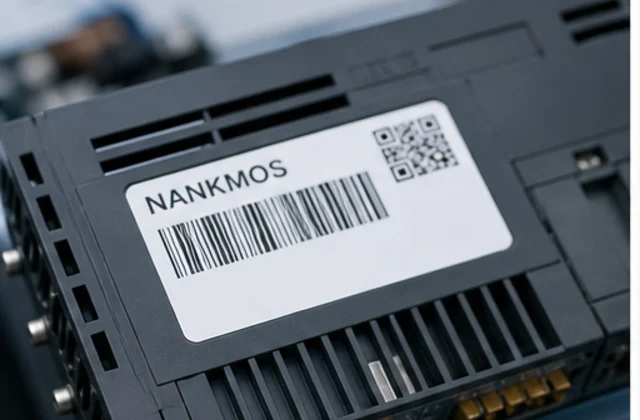

When a PLC module is removed from an operating system, its label is often the fastest route to a reliable inquiry. The challenge is separating the catalog or model number from serial, revision, certification and lot information.
Photograph the full label
Take a sharp, straight-on photo in good light. Include the whole label and a second photo of the module face so the text can be matched to the hardware.
Look for the catalog or model reference
Common labels include a catalog number, type code, product number or model reference. Serial numbers and date codes are useful supporting details, but they usually do not replace the model identifier.
Keep suffixes and separators
Letters, suffixes, firmware marks and separators can distinguish one variant from another. Copy the identifier exactly first, then add a cleaned version only if the visible format is difficult to search.
Send the system context
Include the controller family, rack, I/O position or application if known. Context helps reduce false matches between visually similar modules.
Read the full identifier, not only the family name
Many PLC modules share a product family but differ by input type, output type, communication interface, revision, or terminal arrangement. Record every character from the nameplate and compare it with the system documentation. A photo of the label, front face, connector side, and installed rack gives useful context when a number is difficult to read.
Confirm the application context
Note whether the module is used for CPU processing, digital or analog I/O, remote communication, safety, power, or a backplane. Include the controller family, rack position, quantity, condition preference, destination, and required delivery timing. This helps separate an exact-match inquiry from a request for compatible options to be reviewed by your engineering team.
When a model is uncertain, send the visible markings and a short system description instead of guessing. The NANKMOS team can review the record and confirm the available information by email.
For the next step, review the NANKMOS product systems, read the relevant resource guidance, or send the model and photos through the inquiry page.
Related guides
View all guides
DeltaV IQ Controller: How Server-Based Control Changes Spare Planning
Emerson’s DeltaV IQ announcement highlights server-based control. Here is how maintenance teams can distinguish host, software, redundancy and physical-controller support boundaries.
Read guide
Siemens and P&G Expand AI Inspection: What Keeps the Line Running
Siemens’ recent AI inspection announcement highlights an interconnected camera, edge-computing and PLC workflow. Here is how maintenance teams can trace faults before replacing hardware.
Read guide
Emerson’s Planned Qatar Service Center: What Flow-Instrument RFQs Still Need
Emerson has announced a planned Qatar automation service center. Here is what buyers should document in flow-instrument RFQs while its capabilities remain future plans.
Read guide
ABB Infinitus and Data-Center DC Power: RFQ Records for Automation Spares
A practical RFQ framework for documenting power, automation, cooling and protection interfaces as data-center power architectures evolve toward DC and hybrid designs.
Read guideSend your part number, photos or nameplate.
Our team will verify, check availability, and reply with options within 24 hours.
[email protected]+86 18359268345WhatsApp